
CSS設定
配信管理 Webページ埋め込みの設定方法についてまとめています
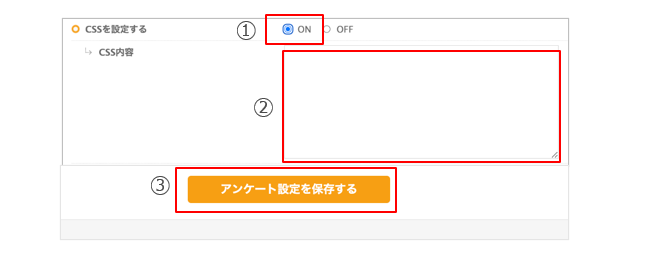
① CSSを設定するを「ON」にします
② CSS内容の箇所にCSSを記述します
③ 「アンケート設定を保存する」ボタンを押下します
CSSのコードサンプル
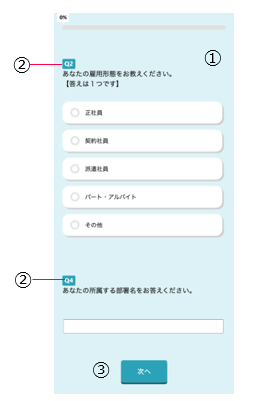
| ① 背景色の変更 | /*背景色を変更する */ body { background-color: #fff } |
| ② 設問番号カラーのラベル | /*設問番号カラーのラベルを変更する */ #question dt span { background-color: blue; } |
| ③ ボタンカラーの変更 | /*ボタンカラーを変更する */ #nextbtn input, #nextbtn button { background-color: blue; box-shadow: 0px 4px 0px 0px rgb(17 1 197); } #nextbtn input:hover, #nextbtn button:hover { background-color: blue; opacity: .4; } #nextbtn input:hover:not([disabled]) { background-color: blue; } |
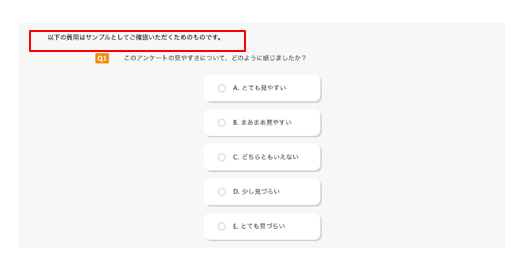
| ④ 設問前・設問後テキスト色 | /*設問前・設問後のテキストの色を変更する */ .bef_text{ color:black; } |
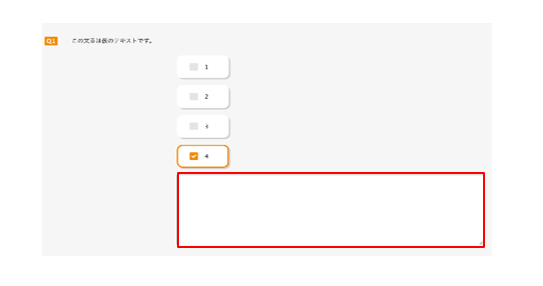
| ⑤選択肢の自由回答(複数行) 入力欄のサイズ調整 | /* 選択肢の「その他」などの場合:自由回答(複数行)のサイズを変更する */ @media (min-width: 768px) { .other_text textarea { width: 800px !important; /* 横幅 */ height: 400px !important; /* 高さ */ } } |
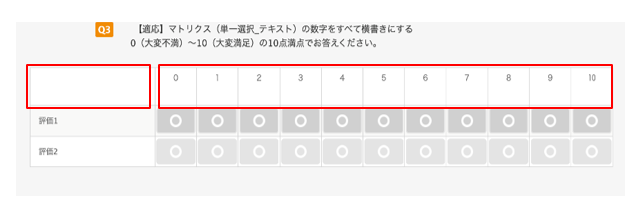
| ⑥ マトリクス全体に指定する場合 | /*マトリクス(単一選択_テキスト)の数字を横書きにする*/ .sa_matrix #answer th div.vertical { text-combine-upright: all; } /*マトリクス(単一選択_テキスト)の回答方向の画像を非表示にする*/ .sa_matrix #answer th img { display : none; } |
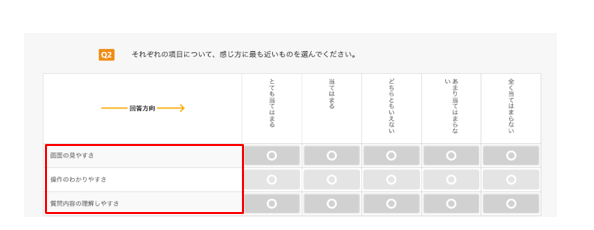
| ⑦マトリクスのサブ設問の横幅を調整する | /*マトリクスのサブ設問の横幅を調整する */ @media (min-width: 768px) { div.survey-answer-item table tbody tr:first-child th:first-child { width:400px !important; } } |